Also, make sure you run ./bin/ember_build.sh in a separate tab.
What’s Left?
So far, we have created an Ember application with a RailsAPI backend and can register, login and logout. There are a few more things that we want to be able to do before we can call it a wrap on this series.
Pass the access token with each request to the backend and require authorization for some data to return.
Force the user to the login page when they try to access a page which requires authentication.
Add validation to our registration form.
Access Token In Each Request
Believe it or not, this is already happening. If you look at auth_manager.js, you will see that in the authenticate function, we add the headers to each AJAX request with the access token.
Let’s test this.
Open up the top_secret route and load place the user list into the controllers model:
Refresh the browser and click on the Top Secret nav item. If you haven’t already registered and/or logged in, do it first.
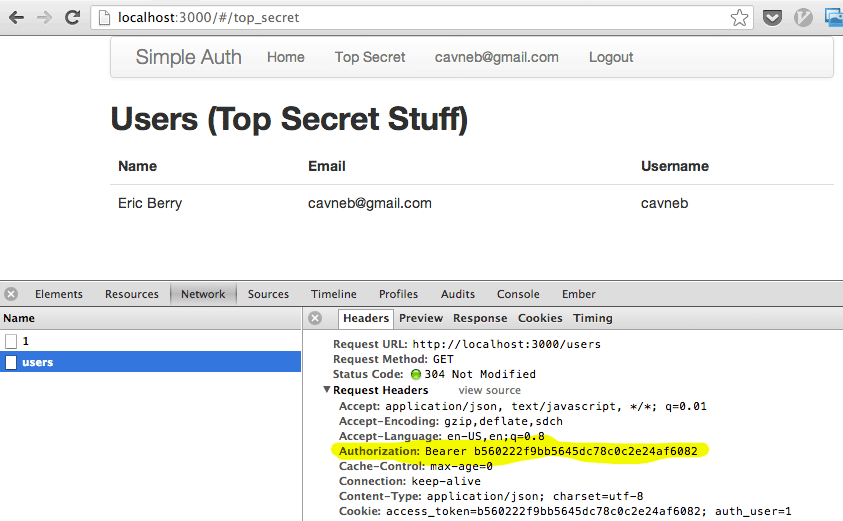
If you view the console when loading this page, you will see the network request made to /users. In this request, you can see the headers sent out, one of which is the Authorization header. If this wasn’t there, we would not be able to see a list of users. Click ‘Logout’ and then go to the Top Secret page again. See? You get a 401 Unauthorized response from /users.
If you still see the users list, it is because they are cached. Refresh the page.
Hide Pages Which Require Authorization
It seems rather silly for us to be able to click on the Top Secret nav item and see an empty list of users. Let’s require the user to be authenticated in order to view that page.
The easiest way to do this is to create a base route which can be extended by routes which require authentication. Create a new route called authenticated.
$ ember generate -r authenticated
public/javascripts/routes/authenticated_route.js
1234567891011121314151617181920212223
varAuthenticatedRoute=Ember.Route.extend({beforeModel:function(transition){if(!App.AuthManager.isAuthenticated()){this.redirectToLogin(transition);}},// Redirect to the login page and store the current transition so we can// run it again after loginredirectToLogin:function(transition){varsessionNewController=this.controllerFor('sessions.new');sessionNewController.set('attemptedTransition',transition);this.transitionTo('sessions.new');},events:{error:function(reason,transition){this.redirectToLogin(transition);}}});module.exports=AuthenticatedRoute;
Now modify the sessions/new controller and redirect to the attemptedTransition if available:
Refresh your browser and click on the Top Secret nav item. You should be redirected to the login page. Now log in and it should redirect you right back to the top secret page.
Form Validation
The final thing I am going to cover (briefly) is performing form validation. This is very simple considering our backend is already giving us what we need. Open up the user.js model and add ‘errors’ as an attribute:
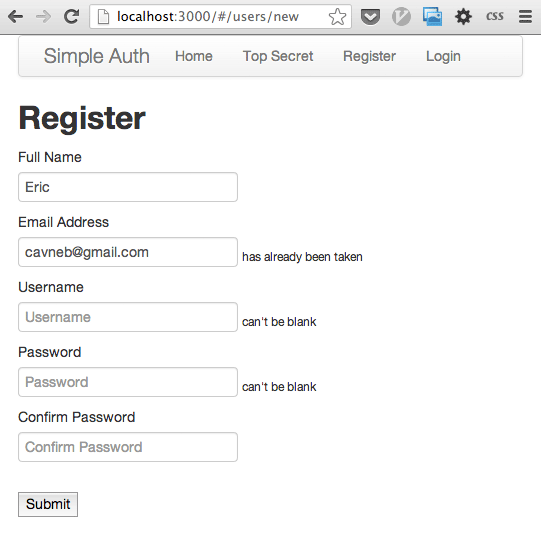
Refresh the browser and play around with the form. You should see error messages on submit if they are invalid. These errors are provided by Rails on the backend and are returned via the API.
I especially want to thank all those who are taking the time to teach Ember via blogs, screencasts and live presentations. I find myself struggling less and less every day because new content comes out from all of you. Thanks!