Recently, I was asked to come up with a better solution to our
captcha needs. We have been using ReCaptcha, which is great
but difficult to read at times, and has caused frustrated
customers and lost sales. I found a great solution at
http://www.jkdesign.org/captcha which displays a number of
graphics and let’s the user choose the right one to prove they
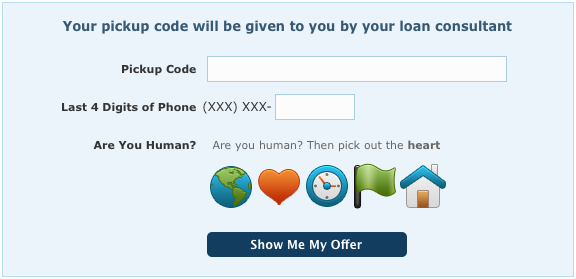
are human. Here is a screenshot of my implementation:
To make this work within Grails, I had to make several tweaks. The following files are required:
Create a new controller called Captcha. This can really be named anything, but if you do rename it, it will have to be updated in the jquery.simpleCaptcha-0.2.js file or passed in as an option via the javascript.
packagecom.berryimportcom.berry.BCryptimportgrails.converters.JSONclassCaptchaController{defindex={// Generate the SALT to be used for encryption and place in sessiondefcaptchaSalt=session.captchaSalt?:BCrypt.gensalt()session.selectedCaptchaText=nullsession.captchaSalt=captchaSalt// Modify below for custom imagesdefimages=['house':'images/captchaImages/01.png','key':'images/captchaImages/04.png','flag':'images/captchaImages/06.png','clock':'images/captchaImages/15.png','bug':'images/captchaImages/16.png','pen':'images/captchaImages/19.png','light bulb':'images/captchaImages/21.png','musical note':'images/captchaImages/40.png','heart':'images/captchaImages/43.png','world':'images/captchaImages/99.png']// Create the image array to be returned in JSON formatdefsize=images.size()defnum=Math.min(params.numImages?params.int('numImages'):5,size)defkeys=images.keySet().toList()defused=[]defrandom=newRandom()(1..num).each{i->defidx=random.nextInt(keys.size())defitem=keys.get(idx)keys.remove(idx)used<<item}// Select the 'chosen' text to be used for authentication and place in sessiondefselectedText=used[random.nextInt(used.size())]defhashedSelectedText=BCrypt.hashpw(selectedText,captchaSalt);session.selectedCaptchaText=hashedSelectedText// println "SELECTED: ${hashedSelectedText}"// println "USED: ${used.inspect()}"// Generate object to be returneddefret=[text:selectedText,images:[]]used.each{u->ret['images']<<[hash:BCrypt.hashpw(u,captchaSalt),file:images[u]]}renderretasJSON}}
What this controller does is return a JSON object with the data needed to generate the captcha. The JSON appears like so:
Now we just need to implement this in our GSP file and controller. Suppose we have a page like shown above with a pickup code and the last 4 digits of the persons phone number. With adding our captcha div and required javascript, our GSP would look like this:
<!-- PLACE IN HEADER --><script type="text/javascript"src="${resource(dir:'js',file:'jquery.simpleCaptcha-0.2.js')}"></script><style type="text/css">img.simpleCaptcha{margin:2px!important;cursor:pointer;}img.simpleCaptchaSelected{margin-bottom:0px;border-bottom:2pxsolidred;}</style><!-- BODY CONTENTS --><g:formaction="pickup"><divclass="stylized myform"style="width:542px;"><h2>Your pickup code will be given to you by your loan consultant</h2><g:iftest="${flash.message}"><divclass="error"> ${flash.message}
</div></g:if><divclass="clearfix formField"><labelclass="label_only">Pickup Code</label><g:textFieldname="pickupCode"value="${pickupCode}"autocomplete="no"class="text"/></div><divclass="clearfix formField"><labelclass="label_only">Last 4 Digits of Phone</label><spanclass="after_checkbox"style="padding-right: 0px;">(XXX) XXX-</span><g:textFieldname="lastFourDigits"value="${lastFourDigits}"autocomplete="no"class="text"maxLength="4"/></div><divclass="clearfix formField"><labelclass="label_only">Are You Human?</label><divstyle="float: left; margin-left: 10px;"><!-- Begin Captcha --><divid="captcha"></div><!-- End Captcha --></div></div><divclass="clearfix"style="margin-top: 15px;"><labelclass="label_only"> </label><g:submitButtonname="submit"value="Show Me My Offer"class="button"/></div></div></g:form><script type="text/javascript">$(document).ready(function(){$('#captcha').simpleCaptcha({numImages:5,introText:'<p>Are you human? Then pick out the <strong class="captchaText"></strong></p>'});});</script>
Finally, we need to perform the validation on the controller side. The modified authentication action would look like the following:
123456789101112
defpickup={// Determine if the captcha is picked correctlyif(params.captchaSelection!=session.selectedCaptchaText){// They selected the correct Captcha image. Continue with Authentication}else{flash.message="You did not click the correct image below. Please Try Again."}}
So there ya go. It’s actually pretty easy and customers seem to like choosing an image much more than typing a word that is difficult to read.